

Heuristic Evaluation and Concept Walkthrough
UX Research
Prototyping
UX Design
The aim of this project was to understand user issues through heuristic evaluation methods, and test solutions by walking users through various prototyped concepts.
1 week
3 member team


Goodreads has been a trusted companion for book lovers worldwide, offering a platform to discover, organise and share reading experiences. While its extensive database and social features attract millions, its usability has often been criticised for outdated design, cluttered interfaces and navigational challenges, especially across its website.
The Situation




The website does not seem to be very user-friendly and feels so cluttered.
A few things on the website are hidden behind options that make it a bit clunkier. The actual aesthetics of the website are just fine.
I really want to manage my reading lists but the interface on the website is so terrible.
The reading challenges are a fun way to motivate yourself to keep reading.
It could be smoother and more featured, but it does the job of keeping a log.
What do people think of Goodreads?
So, what needs to change?
The Task

We wanted to understand user issues through heuristic evaluation methods, and test solutions by walking users through various prototyped concepts. We worked on:
Complexity of Navigation
Profile Editing
Discussion
How did we go about it?
Identify Critical User Journeys
Map User Flows

Conduct Heuristic Evalution
Concept Prototyping
Concept Validation
SDS Analysis

Step 1: Identifying Critical User Journeys
Finding the Summary of a Book
The most common action on Goodreads is looking up the summary of a book that you want to read.
Participating in a Discussion
Goodreads is known for its community, and the ‘Discussions’ tab is a way for readers to interact with each other and have conversations!
Changing your Display Name
Goodreads allows users to customise their profile for maximum personalisation!
The Action!
Step 2: Mapping User Flows
Read the summary of a book
Participate in a Discussion About a Book
Changing display name
Step 3: Conducting Heuristic Evaluation
A heuristic evaluation is a method for identifying design problems in a user interface. Evaluators judge the design against a set of guidelines (called heuristics) that make systems easy to use (Learn more here!). We evaluated each screen in all three chosen critical user journeys.
Below is an example of the evaluation conducted on the Home page, which is common to all user journeys. Hover over the highlighted numbers to view the heuristic, issues, severity and recommendation for the violation.

Step 4: Concept Prototyping
We used the 'Paper Prototyping' method to get an idea of how we wanted to improve the user experience of the website. We then voted for each other's best ideas to ensure that we had common goals in mind before we started creating and prototyping our individual concepts on Figma for user testing.

Prototyping on Figma
This was an individual task to come up with a concept for better user experience for all three critical user journeys. Keeping this an individual task ensured that we had diversity across the options presented to the users during testing.
Flow 1: Reading the summary of a book


Flow 2: Participating in a discussion about a book


Flow 3: Changing your display name


Step 5: Concept Validation
A. Prepare Script
It is important to maintain consistency across all interviews as well as make the users feel comfortable.
B. Decide Roles
There are three roles to fulfil- moderator, observer and note taker. As there were three of us, we had an equal chance to perform all roles.
C. Set Up
We had a device for screen and audio recording, and the observer in a different room to prevent any bias.
We interviewed a total of 6 novice users of Goodreads. We also made sure to keep the concepts anonymous as we wanted the users to interact with them without any prior bias.
We asked users to follow the ‘Think Aloud’ protocol while going about their tasks - this gave us insight into their instinctive reactions to certain elements of the design and allowed us to have a glimpse into their thinking process while completing tasks.

Note taker
Moderator
Documentation of User Interviews
User 3: Semantic Differential Scale
Complicated
Inconsistent
Boring
Inefficient
Unhelpful
Overwhelming
Simple
Consistent
Interesting
Efficient
Helpful
Comfortable
Original Flow
Complicated
Inconsistent
Boring
Inefficient
Unhelpful
Overwhelming
Simple
Consistent
Interesting
Efficient
Helpful
Comfortable
Concept 1
Complicated
Inconsistent
Boring
Inefficient
Unhelpful
Overwhelming
Simple
Consistent
Interesting
Efficient
Helpful
Comfortable
Concept 2
Complicated
Inconsistent
Boring
Inefficient
Unhelpful
Overwhelming
Simple
Consistent
Interesting
Efficient
Helpful
Comfortable
Concept 3
User 3
Name: Arya Mohan
Moderator: Ananya
Notes: Shravani
Documentation: Anoushka
Interaction with original website:
What do you know about Goodreads?
Task 1
He browsed through the site with ease, was okay with the fact of encountering a new environment.
He quickly went through the website, this was interesting as he didn't wait for the moderator’s prompts to generate activity and acted out of his own accord.
Noted Hierarchies present across the flow.
Liked the fact that genres were highlighted.
Task 2
Associated discussion with “Community” and navigated to that sub-section (was the script accurate enough here?)
Went to groups.
Throughout the session associated discussions with a sense of belonging and took steps with words that were associated with that feeling.
Likes the dropdown of writing down a book title
Suggested that some copy was misleading and confusing
Lack of signifiers for a scroll was annoying.
Liked the presence of filters.
Task 3
Questioned inputs present on the key screens.
Was unsure as to what is relevant to his experience on the website, which disrupted his interactions with the site.
Likes the pin section, presence of shelves
copy led to some misunderstandings of the actions he was supposed to take.
Concept 1
Task 1
Clicked on Browse button
Confusion of hierarchy on the homepage
breadcrumbs did not match his flow.
wanted more to expand summary on the same page.
Task 2
Icons could be more distinct, they look pretty similar currently.
Presence of cards offered better distinction between sections.
Rest of the flow was intutive.
Task 3
The page was de-cluttered, organized better.
Filter to change view of how books are presented.
Would like to ahve book covers only if he knows books.
Concept 2
Task 1
Homepage: Presence of 2 columns was preferred.
Liked the Fantasy page as that is what was expected by him.
Task 2
Expected to see ongoing discussions immediately.
Confusing copy(sent formation)
Last page of the flow seemed like a summary page.
Task 3
Found the page quite easily.
Would like the bookshelves to have a better visual real life connect.
Liked the confirmation message page.
Flow: “This is what I’m used to”
Concept 3
Task 1
Quotes is highlighted well
would like more to expand on the same page.
liked the tag like format for genres.
Task 2
The gap in the center of the page was disorienting for him.
Checkboxes to sort stuff was important.
Stacking topics instead of them getting lost.
Task 3
Liked the sectioning of information.
As the profile page opens immediately, its easier as the default.
Step 6: SDS Analysis
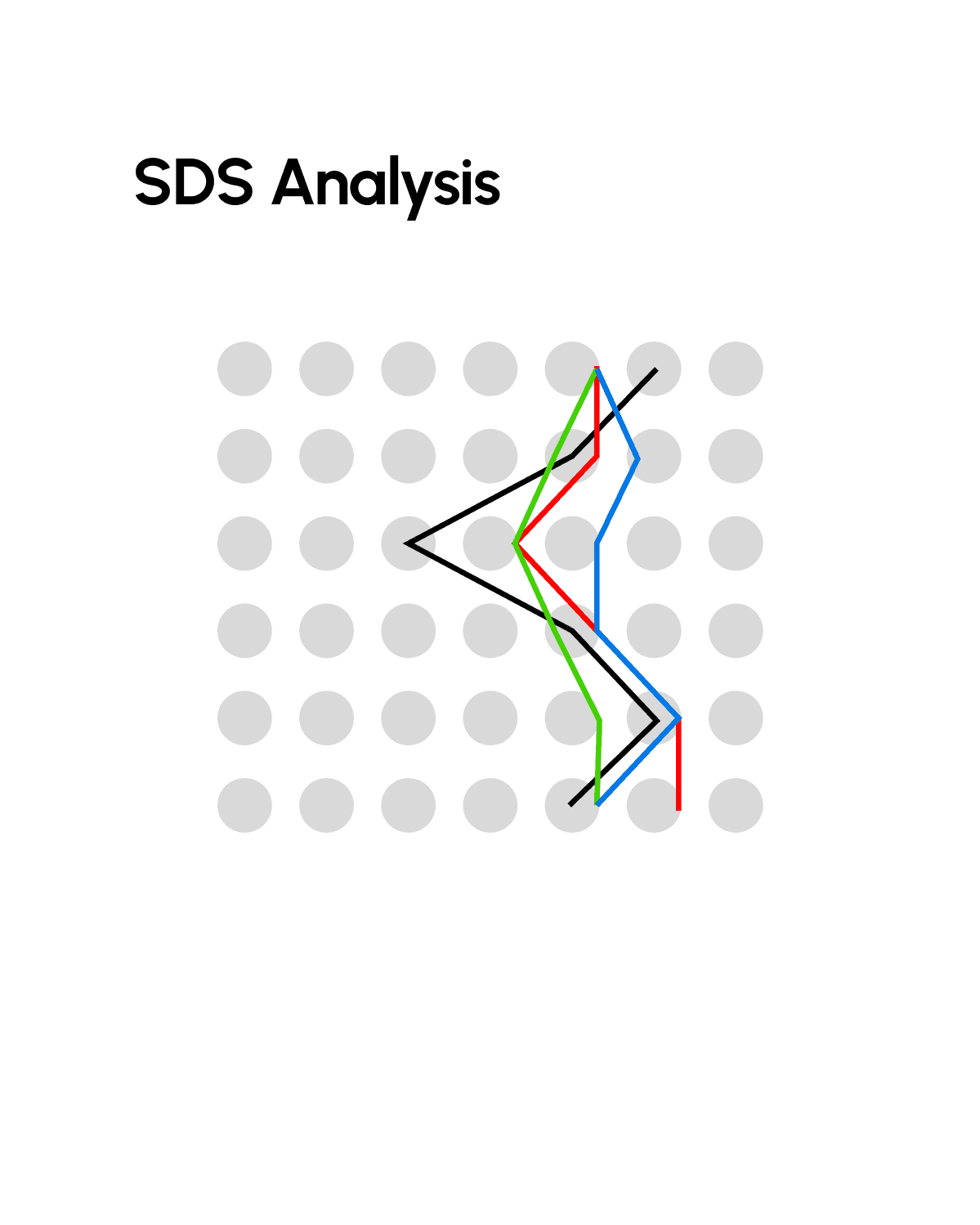
A Semantic Differential Scale (SDS) is a survey tool that measures people's attitudes and feelings by asking them to rate a concept, product, or event on a scale between two opposing adjectives. We carefully chose 7 pairs of opposing adjectives which were applicable to the experience of navigating Goodreads and asked each participant to rate each flow on a scale. To be able to compare the rating accurately, we layered each participant's response for each flow and drew an emergent line connecting the average of all responses.
Complicated
Inconsistent
Boring
Inefficient
Unhelpful
Overwhelming
Simple
Consistent
Interesting
Efficient
Helpful
Comfortable
Concept 3
Complicated
Inconsistent
Boring
Inefficient
Unhelpful
Overwhelming
Simple
Consistent
Interesting
Efficient
Helpful
Comfortable
Concept 3
Complicated
Inconsistent
Boring
Inefficient
Unhelpful
Overwhelming
Simple
Consistent
Interesting
Efficient
Helpful
Comfortable
Concept 3
Complicated
Inconsistent
Boring
Inefficient
Unhelpful
Overwhelming
Simple
Consistent
Interesting
Efficient
Helpful
Comfortable
Concept 3
Complicated
Inconsistent
Boring
Inefficient
Unhelpful
Overwhelming
Simple
Consistent
Interesting
Efficient
Helpful
Comfortable
Concept 3
Complicated
Inconsistent
Boring
Inefficient
Unhelpful
Overwhelming
Simple
Consistent
Interesting
Efficient
Helpful
Comfortable
Concept 3
Complicated
Inconsistent
Boring
Inefficient
Unhelpful
Overwhelming
Simple
Consistent
Interesting
Efficient
Helpful
Comfortable
Concept 2
Complicated
Inconsistent
Boring
Inefficient
Unhelpful
Overwhelming
Simple
Consistent
Interesting
Efficient
Helpful
Comfortable
Concept 2
Complicated
Inconsistent
Boring
Inefficient
Unhelpful
Overwhelming
Simple
Consistent
Interesting
Efficient
Helpful
Comfortable
Concept 2
Complicated
Inconsistent
Boring
Inefficient
Unhelpful
Overwhelming
Simple
Consistent
Interesting
Efficient
Helpful
Comfortable
Concept 2
Complicated
Inconsistent
Boring
Inefficient
Unhelpful
Overwhelming
Simple
Consistent
Interesting
Efficient
Helpful
Comfortable
Concept 2
Complicated
Inconsistent
Boring
Inefficient
Unhelpful
Overwhelming
Simple
Consistent
Interesting
Efficient
Helpful
Comfortable
Concept 2
Complicated
Inconsistent
Boring
Inefficient
Unhelpful
Overwhelming
Simple
Consistent
Interesting
Efficient
Helpful
Comfortable
Original Flow
Complicated
Inconsistent
Boring
Inefficient
Unhelpful
Overwhelming
Simple
Consistent
Interesting
Efficient
Helpful
Comfortable
Original Flow
Complicated
Inconsistent
Boring
Inefficient
Unhelpful
Overwhelming
Simple
Consistent
Interesting
Efficient
Helpful
Comfortable
Original Flow
Complicated
Inconsistent
Boring
Inefficient
Unhelpful
Overwhelming
Simple
Consistent
Interesting
Efficient
Helpful
Comfortable
Original Flow
Complicated
Inconsistent
Boring
Inefficient
Unhelpful
Overwhelming
Simple
Consistent
Interesting
Efficient
Helpful
Comfortable
Original Flow
Complicated
Inconsistent
Boring
Inefficient
Unhelpful
Overwhelmin
Simple
Consistent
Interesting
Efficient
Helpful
Comfortable
Original Flow
Complicated
Inconsistent
Boring
Inefficient
Unhelpful
Overwhelming
Simple
Consistent
Interesting
Efficient
Helpful
Comfortable
Concept 1
Complicated
Inconsistent
Boring
Inefficient
Unhelpful
Overwhelming
Simple
Consistent
Interesting
Efficient
Helpful
Comfortable
Concept 1
Complicated
Inconsistent
Boring
Inefficient
Unhelpful
Overwhelming
Simple
Consistent
Interesting
Efficient
Helpful
Comfortable
Concept 1
Complicated
Inconsistent
Boring
Inefficient
Unhelpful
Overwhelming
Simple
Consistent
Interesting
Efficient
Helpful
Comfortable
Concept 1
Complicated
Inconsistent
Boring
Inefficient
Unhelpful
Overwhelming
Simple
Consistent
Interesting
Efficient
Helpful
Comfortable
Concept 1
Complicated
Inconsistent
Boring
Inefficient
Unhelpful
Overwhelming
Simple
Consistent
Interesting
Efficient
Helpful
Comfortable
Concept 1
Then, we juxtaposed the emergent lines from each flow onto one scale. The line that tends the most towards the right (positive adjectives) is the winner!
Complicated
Inconsistent
Boring
Inefficient
Unhelpful
Overwhelming
Simple
Consistent
Interesting
Efficient
Helpful
Comfortable
Original
Concept 1
Concept 2
Concept 3
Concept 1: Ananya Krishnan
Concept 2: Anoushka Goel
Concept 3: Shravani Agashe
The Result!
The users have spoken!
Consistent Visual Language
Novice users of Goodreads prefer a website that is extremely consistent in terms of visual language.
Helpful Interface, Non-Cluttered Layout
Users tended to prefer interacting with non-cluttered layouts which still had the familiarity of the grid system of the original website.
Explicit & Visible Confirmation Statuses
Users also enjoyed explicit and visible confirmation statuses, and simplified task flows.

What could we have done better?
Re-arrange the order of the concepts as presented to the users to prevent decisions made due to fatigue - users seemed to increase their SDS scores towards the end, which favoured Concept 3.
Make the user comfortable, and remind them that they are not being tested, the product is.
It gets tiring to take the interviews one after the other - it is important to space them out to prevent any rushing due to fatigue.

